.png)
5 Essential Workstation Gadgets for a More Productive Desk Setup
Working or studying from home requires more than simply placing a computer on a desk. A well-organized workspace can make it easier to stay focused, reduce unnecessary clutter, and remain comfortable during long hours at your computer.
The right combination of technology and ergonomic accessories can transform an ordinary desk into a more functional and comfortable workstation.
From monitor positioning and cable management to convenient charging and better lighting, here are five practical workstation gadgets worth considering for your home office or study space.
1. Ergonomic Dual-Monitor Adjustable Arm Stand
If you spend several hours each day looking at computer screens, proper monitor positioning can make a significant difference to your workspace.
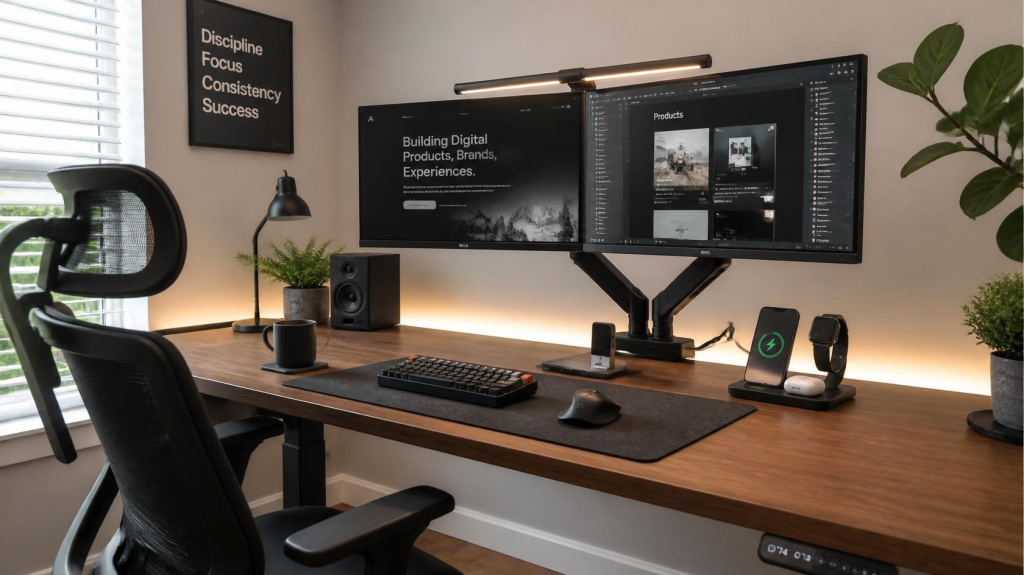
A dual-monitor arm allows you to adjust the height, angle, and position of your screens while freeing up the desk space normally occupied by traditional monitor stands.
Key Advantages
- More Desk Space: Removes bulky monitor bases from the desktop.
- Flexible Positioning: Adjust the height, tilt, rotation, and viewing angle of your monitors.
- Landscape or Portrait Mode: Many models allow screens to be rotated for different tasks.
- Cable Management: Integrated channels can help keep display and power cables organized.
- Cleaner Workspace: Creates a more streamlined and minimalist desk setup.
Before purchasing, check the arm’s maximum weight capacity and make sure it is compatible with your monitor size and mounting standard.
2. Wireless 3-in-1 Charging Station
Managing separate charging cables for a smartphone, smartwatch, and wireless earbuds can quickly make a desk look cluttered.
A 3-in-1 charging station can consolidate compatible devices into a single charging area, helping reduce cable clutter while keeping frequently used electronics within easy reach.
Key Advantages
- Reduced Cable Clutter: Keeps multiple charging cables organized in one location.
- Multiple Devices: Designed to charge several compatible devices from one station.
- Convenient Viewing Angle: Many stands hold a smartphone upright for easy access to notifications.
- Compact Design: Takes up less space than keeping several separate chargers on the desk.
- Built-In Protection: Some models include features such as temperature, over-voltage, and overcharge protection.
Always check device compatibility and the manufacturer’s charging requirements before purchasing.
3. Dimmable LED Monitor Light Bar
Traditional desk lamps can take up valuable workspace and may create unwanted reflections on a computer display.
A monitor light bar attaches to the top of a compatible monitor and directs light toward the desk surface. This can provide additional workspace illumination without requiring a large lamp beside your keyboard.
Key Advantages
- Minimal Desk Footprint: Attaches directly to the monitor instead of occupying desk space.
- Directional Lighting: Designed to illuminate the workspace while limiting direct light on the screen.
- Adjustable Brightness: Lets you adapt the light level to different working conditions.
- Adjustable Color Temperature: Some models offer warmer and cooler lighting options.
- Clean Design: Helps maintain a simple and organized workstation.
Check the manufacturer’s compatibility requirements, especially if your monitor has a curved or unusually shaped display.
4. Under-Desk Cable Management Tray
Loose cables, power strips, and charging adapters can quickly turn the area underneath your desk into a tangled mess.
An under-desk cable management tray provides a dedicated location for power strips, adapters, and excess cables, helping keep them organized and away from the floor.
Key Advantages
- Cleaner Workspace: Keeps cables and power accessories out of sight.
- Better Organization: Provides a central location for power strips and adapters.
- Reduced Floor Clutter: Helps keep cables away from your feet and chair wheels.
- Easy Access: Keeps essential connections within reach when adjustments are needed.
- Multiple Installation Options: Depending on the model, trays may use screws, clamps, or other mounting methods.
Before installing one, check the tray’s dimensions, weight capacity, and installation requirements.
5. Temperature-Controlled Coffee Mug Warmer
Getting deeply focused on work can make it easy to forget about the coffee or tea sitting beside your keyboard.
A temperature-controlled mug warmer can help keep a compatible beverage warm while you work, reducing the need to repeatedly reheat your drink.
Key Advantages
- Keeps Drinks Warm: Designed to maintain a suitable temperature for compatible beverages.
- Automatic Activation: Some models use a pressure or gravity sensor to activate when a mug is placed on the warming surface.
- Adjustable Temperature: Certain models allow you to select a preferred heat setting.
- Compact Footprint: Takes up very little space on most desks.
- Easy Cleaning: Models with smooth, water-resistant surfaces can be easier to wipe clean.
Always follow the manufacturer’s instructions regarding suitable mugs, liquids, temperature settings, and safe operation.
How to Build the Ultimate High-Productivity Desk Setup
Creating a productive workstation isn’t about filling your desk with technology. The goal is to choose accessories that solve everyday problems and make your workspace more comfortable and organized.
Start by improving the fundamentals:
Keep Your Monitors Properly Positioned
Position your screens at a comfortable height and viewing distance. An adjustable monitor arm can make it easier to find a setup that works for your desk and working style.
Keep Cables Under Control
Use an under-desk cable tray or other cable-management accessories to keep power strips and excess cables organized.
Improve Your Workspace Lighting
A monitor light bar can provide focused illumination while preserving valuable desk space.
Keep Devices Charged
A multi-device charging station can give your phone, smartwatch, and other compatible electronics a dedicated charging location.
Add Small Comfort Upgrades
A mug warmer or other simple desk accessory can make long work or study sessions more convenient.
Final Thoughts
A productive home workstation doesn’t need to be expensive or complicated. A few carefully selected accessories can make a noticeable difference in how your desk looks and functions.
A dual-monitor arm can improve screen positioning and free up desk space, while a 3-in-1 charging station helps organize everyday devices. A monitor light bar provides focused workspace lighting, a cable management tray keeps wiring under control, and a mug warmer adds a small but convenient comfort upgrade.
Instead of buying every trending desk gadget, focus on the accessories that solve problems you actually experience. A clean, organized, and comfortable workspace can make your daily work or study routine much easier to manage.